  1
  2
  3
  4
  5
  6
  7
  8
  9
 10
 11
 12
 13
 14
 15
 16
 17
 18
 19
 20
 21
 22
 23
 24
 25
 26
 27
 28
 29
 30
 31
 32
 33
 34
 35
 36
 37
 38
 39
 40
 41
 42
 43
 44
 45
 46
 47
 48
 49
 50
 51
 52
 53
 54
 55
 56
 57
 58
 59
 60
 61
 62
 63
 64
 65
 66
 67
 68
 69
 70
 71
 72
 73
 74
 75
 76
 77
 78
 79
 80
 81
 82
 83
 84
 85
 86
 87
 88
 89
 90
 91
 92
 93
 94
 95
 96
 97
 98
 99
100
101
102
103
104
105
106
107
108
109
110
111
112
113
114
115
116
117
118
119
120
121
122
123
124
125
126
127
128
129
130
131
132
133
134
135
136
137
138
139
140
141
142
143
144
145
146
147
148
149
150
151
152
153
154
155
156
157
158
159
160
161
162
163
164
165
166
167
168
169
170
171
172
173
174
175
176
177
178
179
180
181
182
183
184
185
186
187
188
189
190
191
192
193
194
195
196
197
198
199
200
201
202
203
204
205
206
207
208
209
210
211
212
213
214
215
216
217
218
219
220
221
222
223
224
225
226
227
228
229
230
231
232
233
234
235
236
237
238
239
240
241
242
243
244
245
246
247
248
249
250
251
252
253
254
255
256
257
258
259
260
261
262
263
264
265
266
267
268
269
270
271
272
273
274
275
276
|
# 站点基础配置
baseurl: https://dsmggm.github.io/  # 站点的基础 URL
languageCode: en-us  # 默认语言代码
theme: hugo-theme-stack  # 使用的主题名称
title: Dsmggm博客  # 网站标题
copyright: Dsmggm  # 版权信息

# 主题国际化支持
# 可用值: ar, bn, ca, de, el, en, es, fr, hu, id, it, ja, ko, nl, pt-br, th, uk, zh-cn, zh-hk, zh-tw
DefaultContentLanguage: zh-cn  # 默认内容语言为简体中文

# 如果 DefaultContentLanguage 是 [zh-cn ja ko] 中的一种,则设置为 true
# 这将使 .Summary 和 .WordCount 对于 CJK 语言正确工作
hasCJKLanguage: true

# 多语言配置
languages:
    en:
        languageName: English  # 语言显示名称
        title: dsmggm blog  # 英文版网站标题
        weight: 1  # 语言权重,数字越小优先级越高
        params:
            sidebar:
                subtitle: 日常记录与学习~  # 侧边栏副标题
    zh-cn:
        languageName: 中文  # 语言显示名称
        title: dsmggm博客  # 中文版网站标题
        weight: 2  # 语言权重
        params:
            sidebar:
                subtitle: 日常记录与学习~  # 侧边栏副标题

# 第三方服务配置
services:
    # Disqus 评论系统配置
    disqus:
        shortname: "hugo-theme-stack"  # Disqus 短名称
    # Google Analytics 配置
    googleAnalytics:
        id:  # GA 跟踪 ID

# 分页配置
pagination:
    pagerSize: 100  # 每页显示的文章数量

# 固定链接配置
permalinks:
    post: /p/:slug/  # 文章页面的固定链接格式
    page: /:slug/  # 页面的固定链接格式

# 参数配置
params:
    mainSections:
        - post  # 主要内容部分
    featuredImageField: image  # 特色图片字段
    rssFullContent: true  # RSS 是否输出全文内容
    favicon: /favicon.ico  # 网站图标路径

    # 页脚配置
    footer:
        since: 2020  # 网站建立年份
        customText:  # 自定义页脚文本

    # 日期格式配置
    dateFormat:
        published: 2006-01-02  # 发布日期格式
        lastUpdated: 2006-01-02 15:04 MST  # 最后更新日期格式

    # 侧边栏配置
    sidebar:
        emoji: ✅  # 侧边栏表情符号
        subtitle: 欢迎来到我的网站  # 侧边栏副标题
        avatar:
            enabled: true  # 是否启用头像
            local: true  # 是否使用本地头像
            src: img/avatar.png  # 头像图片路径

    # 文章页面配置
    article:
        math: false  # 是否启用数学公式支持
        toc: true  # 是否显示目录
        readingTime: false  # 是否显示阅读时间
        license:
            enabled: false  # 是否启用许可证
            default: Licensed under CC BY-NC-SA 4.0  # 默认许可证文本

    # 评论系统配置
    comments:
        enabled: true  # 是否启用评论
        provider: giscus  # 评论提供商

        # DisqusJS 配置
        disqusjs:
            shortname:
            apiUrl:
            apiKey:
            admin:
            adminLabel:

        # Utterances 评论插件配置
        utterances:
            repo: dsmggm/dsmggm.github.io
            issueTerm: pathname
            label: comment

        # Beaudar 配置
        beaudar:
            repo:
            issueTerm: pathname
            label:
            theme:

        # Remark42 配置
        remark42:
            host:
            site:
            locale:

        # Vssue 配置
        vssue:
            platform:
            owner:
            repo:
            clientId:
            clientSecret:
            autoCreateIssue: false

        # Waline 客户端配置
        waline:
            serverURL:
            lang:
            pageview:
            emoji:
                - https://unpkg.com/@waline/[email protected]/weibo
            requiredMeta:
                - name
                - email
                - url
            locale:
                admin: Admin
                placeholder:

        # Twikoo 配置
        twikoo:
            envId:
            region:
            path:
            lang:

        # Cactus 配置
        cactus:
            defaultHomeserverUrl: "https://matrix.cactus.chat:8448"
            serverName: "cactus.chat"
            siteName: ""

        # Giscus 配置
        giscus:
            repo: dsmggm/dsmggm.github.io
            repoID: R_kgD1111
            category: Show and tell
            categoryID: DIC_kw1111Ge
            mapping: pathname
            lightTheme: preferred_color_scheme
            darkTheme: preferred_color_scheme
            reactionsEnabled: 1
            emitMetadata: 0

        # Gitalk 配置
        gitalk:
            owner:
            admin:
            repo:
            clientID:
            clientSecret:
            proxy:

        # Cusdis 配置
        cusdis:
            host:
            id:

    # 小工具配置
    widgets:
        homepage:  # 首页小工具
            - type: search  # 搜索小工具
            # - type: archives  # 归档小工具
            #   params:
            #       limit: 5  # 显示归档数量限制
            - type: categories  # 分类小工具
              params:
                  limit: 10  # 显示分类数量限制
            - type: tag-cloud  # 标签云小工具
              params:
                  limit: 10  # 显示标签数量限制
        page:
            - type: toc  # 目录小工具

    # OpenGraph 配置
    opengraph:
        twitter:
            site:  # Twitter 用户名
            card: summary_large_image  # Twitter 卡片类型

    # 默认图片配置
    defaultImage:
        opengraph:
            enabled: false  # 是否启用 OpenGraph 图片
            local: false  # 是否使用本地图片
            src:  # 图片源地址

    # 颜色主题配置
    colorScheme:
        toggle: true  # 是否显示主题切换按钮
        default: auto  # 默认主题模式 (auto, light, dark)

    # 图片处理配置
    imageProcessing:
        cover:
            enabled: true  # 是否启用封面图片处理
        content:
            enabled: true  # 是否启用内容图片处理

# 自定义菜单配置
# 更多信息参考: https://stack.jimmycai.com/config/menu
# 要移除关于、归档和搜索页面的菜单项,请从它们的 FrontMatter 中移除 `menu` 字段
menu:
    main: []  # 主菜单

    social:  # 社交菜单
        - identifier: github  # 唯一标识符
          name: GitHub  # 显示名称
          url: https://github.com/dsmggm  # 链接地址
          params:
              icon: brand-github  # 图标

# 相关文章配置
related:
    includeNewer: true  # 是否包含较新的文章
    threshold: 60  # 相关性阈值
    toLower: false  # 是否转换为小写
    indices:
        - name: tags  # 标签索引
          weight: 100  # 权重

        - name: categories  # 分类索引
          weight: 200  # 权重

# 内容渲染配置
markup:
    goldmark:
        extensions:
            passthrough:
                enable: true
                delimiters:
                    block:
                        - - \[
                          - \]
                        - - $$
                          - $$
                    inline:
                        - - \(
                          - \)
        renderer:
            unsafe: true  # 是否允许 Markdown 中包含 HTML 内容
    tableOfContents:
        endLevel: 4  # 目录结束级别
        ordered: true  # 是否使用有序列表
        startLevel: 2  # 目录开始级别
    highlight:
        noClasses: false  # 是否不使用 CSS 类
        codeFences: true  # 是否启用代码围栏
        guessSyntax: true  # 是否自动猜测语法
        lineNoStart: 1  # 行号起始值
        lineNos: true  # 是否显示行号
        lineNumbersInTable: true  # 行号是否在表格中
        tabWidth: 4  # Tab 宽度
|

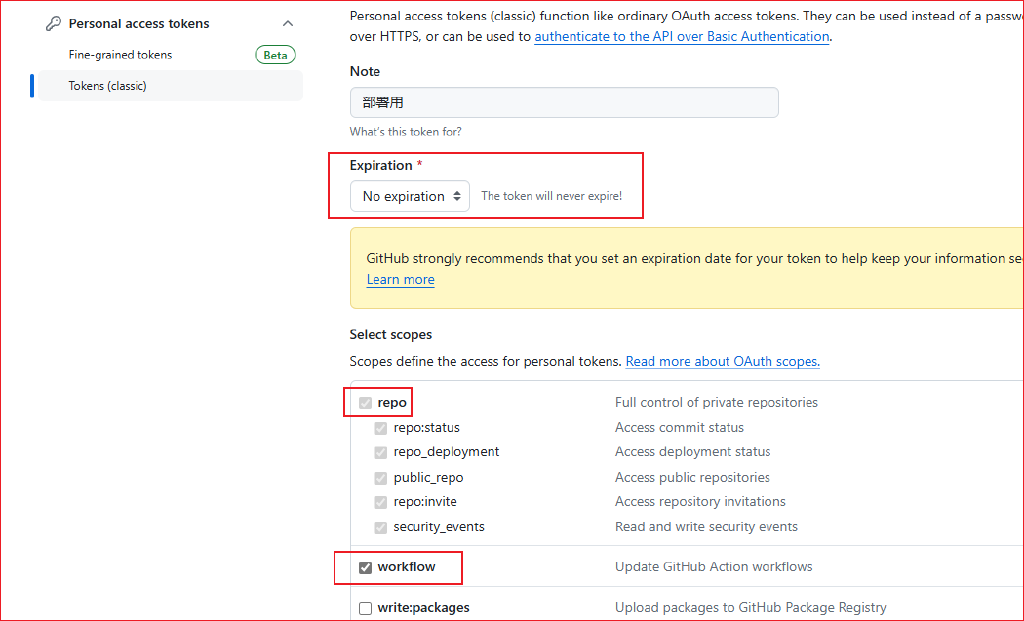
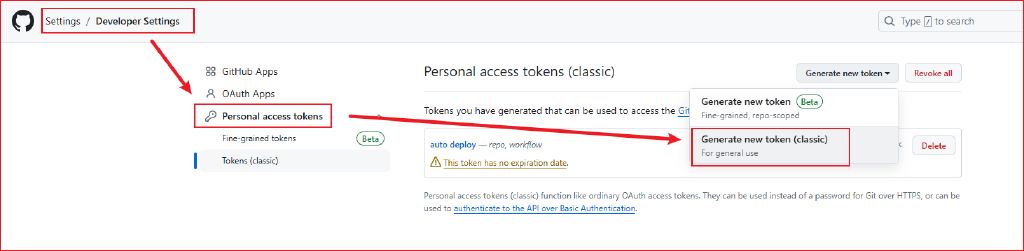 token选择永不过期,并勾选 repo 和 workflow 选项
 为保证安全,将生成的token,保存的仓库的变量中,前往Settings -> Secrets and variables -> Actions中设置
 自动流文件创建:.github/workflows/deploy.yml